I’ve been a copywriter long enough to have written for HubSpot, Backlinko, and ClickUp. In that time, I’ve saved thousands of headlines, hooks, and hero sections I told myself I’d “use later.” I can count on one hand how many times I actually went back and used one.
That’s not a discipline problem. I know plenty of writers who save more diligently than I do, tag everything, even write little notes explaining why a line worked. Their swipe files are still graveyards. Mine is too. And I’ve come to think the reason is simple: every tool we use for this was built to make saving easy, not to make finding easy again later. Those are two completely different jobs, and the industry has spent years solving the wrong one.
The saving problem was solved a decade ago
Chrome extensions that clip a page. Bookmark folders. A Notion database with a “swipe file” tag. A Google Doc titled “Copy Ideas” that’s now 40 pages long, and nobody opens past page 3. All of these are good at the moment of capture. You see a great CTA, you save it in two clicks, you feel productive, you move on.
The problem shows up three weeks later, when you’re staring at a blank page for a client’s landing page, and you know, you just know, you saved something like this before. Was it that fintech onboarding flow? The SaaS pricing page with the weird pun? You start scrolling. You start Ctrl+F-ing a document that has no consistent structure because you wrote those notes at 11 pm on different days with different moods. Fifteen minutes later you give up and write from scratch, which is exactly what you would have done if you’d never saved anything at all.
I don’t think that’s a “you” problem. I think it’s what happens when the entire swipe file industry, tools and advice both, treats collection as the finish line.
Why the standard advice makes this worse, not better
Ask around, and you’ll get the same recommendations every time: keep a Notion database, tag rigorously, review your swipe file weekly, build folders by industry. I’ve tried all of it. Here’s my honest opinion: most of this advice optimizes for looking organized, not for being retrievable.
A Notion database with fifteen tag categories feels thorough right up until you’re trying to remember which tag you used for “scarcity” versus “urgency” versus “FOMO,” three tags that mean the same thing to three different past versions of you. Tagging discipline degrades the moment you’re saving something fast, mid-research, on deadline. And a weekly review ritual assumes you have spare hours to re-read old saves speculatively, hoping something sticks, instead of pulling up the right one in the ten seconds you actually have when a brief lands on your desk.
There’s also a location problem nobody talks about. Copywriters don’t research in Notion. We research in the browser, fifteen tabs deep, reading a competitor’s homepage or a cold email that landed in our own inbox. Every “I’ll paste this into my swipe file doc later” is a context switch, and a context switch is a task you’ll forget to finish. The tool that wins here isn’t the one with the prettiest database schema. It’s the one sitting inside the page you’re already reading, so saving doesn’t cost you the momentum of actually working.
What retrieval actually requires
If I strip away everything cosmetic, finding a saved line again, on demand, three months later, needs four things.
- It needs to live where you already work, in the browser, not in a separate app you have to remember exists.
- It needs to be searchable by what you meant, not by the exact words you happened to type into a tag field at 11 pm.
- It needs to be grouped by the thing you’re actually working on, a client, a campaign, not by a generic bucket like “inspiration.”
- And it needs to still be there next year, which means it can’t depend entirely on one company’s server staying in business.
Pocket shut down in July 2025 and took a decade of saved reading with it for anyone who didn’t export in time. That’s not a hypothetical risk anymore; it’s a thing that already happened to people exactly like you and me.
Almost nothing on the market does all four. The highlighters are great at capture and mediocre at search. The read-later apps are great at reading and treat highlighting as an afterthought. The AI knowledge tools are great at summarizing and expensive, because you’re paying for someone else’s AI bill baked into your subscription, plus your data sits on their servers whether you like it or not.
Why I built SyncMyCopy the way I did
I built SyncMyCopy because I wanted the tool I just described, and nobody had made it. You highlight text on any page; the highlight saves instantly and stays there when you come back to that page later. You can drop it straight into a project while you’re still reading, no separate app to open. Projects are how a pile of random saves turns into something you’d actually call a swipe file, one per client or campaign, instead of one undifferentiated pit labeled “stuff I liked.”
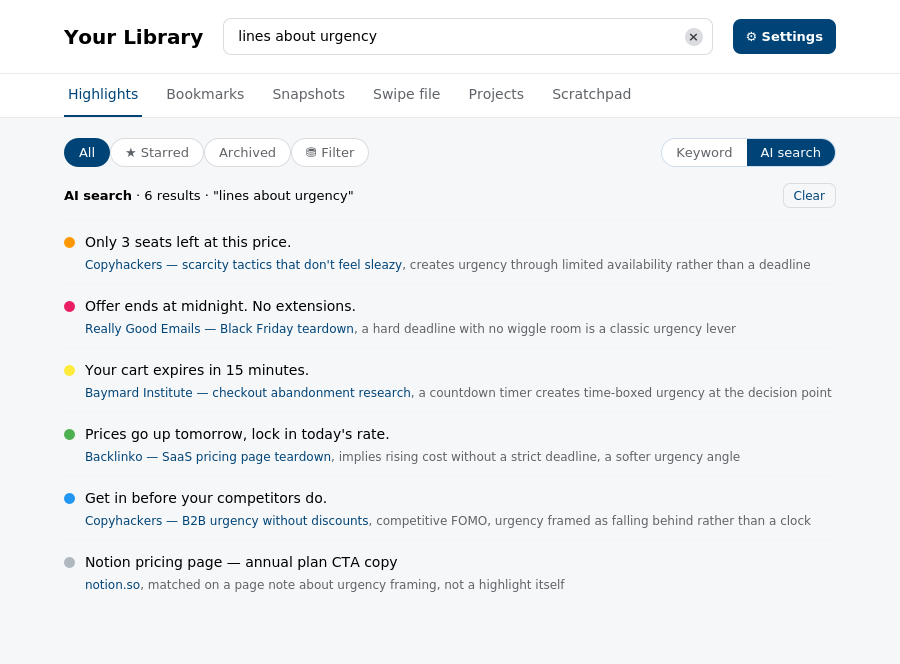
Search is the part I care about most, because search is the actual point of a swipe file. You can search by keyword, the fast way, when you remember the words. You can also search by meaning, ask for “lines about urgency,” and it surfaces highlights about urgency even when the word “urgency” never appears in them.
That search runs on your own AI key. I’m not reselling AI access with a markup baked into your bill, which is the main reason competitors charge $9 to $12 a month. I don’t have that cost to pass on, so I don’t.
Everything you save- your highlights, notes, and clipped pages- lives on your device and in your own Google Drive. I don’t have a server storing your client’s confidential positioning work or the competitor research you’d rather not have sitting on someone else’s infrastructure. If SyncMyCopy disappeared tomorrow, your library is still yours, sitting in your Drive exactly where it always was. That’s not a policy I promise you; it’s how the storage is actually built.
The whole thing is $3.14 a month. That number is a pi easter egg, yes, but it’s also real: because I don’t pay for your AI usage and I don’t pay to host your content, my costs stay tiny no matter how many people use it, so I’m not pricing this to subsidize a loss-leader I’ll quietly raise later. Bookmark sync across your browsers is free for everyone, no card required, because it costs me almost nothing to run.
Where I haven’t caught up yet
I’d rather tell you the gaps than let you find them after you’ve already installed it. There’s no PDF highlighting yet; if your research lives mostly in PDFs and not web pages, this isn’t there for you today. There’s no mobile app. There’s no way to pull in newsletters or RSS feeds automatically.
If you want spaced-repetition flashcard review of old highlights, that’s not what this does either. Those are real, and I’m not going to pretend otherwise to make the pitch cleaner. These are on my roadmap though. As a solo developer, there’s only so much I can do at once.
What I’d push back on is the assumption that those gaps matter more than the retrieval problem does. A tool with PDF highlighting and a mobile app that you still can’t search by meaning, that still doesn’t organize by project, that still stores your client research on someone else’s servers, solves the wrong problem more completely.
I’d rather solve the right problem first and add the rest as I go, than ship a feature checklist that looks impressive and still leaves you Ctrl+F-ing a graveyard three weeks from now. I didn’t want to launch without the core feature that kept me from writing from scratch every single time, because I couldn’t find a substantial part of my already done research on time, whenever needed.
SyncMyCopy Is Yours
Here’s my honest opinion, and it’s the whole reason I wrote this: collecting good copy was never the hard part. Anyone can highlight a headline. The hard part, the part that actually determines whether a swipe file makes you a better, faster writer or just makes you feel productive for five minutes, is whether you can find that headline again exactly when you need it. Most tools, and most advice, quietly gave up on that second part and let you believe the first part was the whole job.
If you actually care about the research behind your copy and campaigns, not the ritual of saving things but the outcome of being able to use what you saved, that’s what I built SyncMyCopy for.
Try it, save something today, and in three weeks go looking for it. That test is the only one that matters, and it’s the one every other swipe file tool I’ve used has failed.