You too have a backlog of hundreds of bookmarks in the “read later” folder, unread and piling up after years of internet usage. Despite using tools like Raindrop.io, you need a better retrieval system that doesn’t keep your personal knowledge out of your sight.
You might think that the bookmarks you saved will show up every time you need them; think again. People don’t search in bookmark folders even though they have saved them. The problem isn’t saving, tagging, or collecting; it’s actually retrieving whenever needed.
If you’re reading this, you’re probably a Raindrop user, and let me tell you something you might not already know: there’s a difference between what a “permanent copy” sounds like and what it actually means in terms of subscription.
If you understand how your data is handled in Raindrop, you must have already tried several options. But today, you will find what holds up.
If You’ve Got Thousands Of Bookmarks You Can Never Find Again, This Is For You
Raindrop.io is an all-in-one bookmark manager that allows you to save articles, tweets, YouTube videos, and more. If you pay for a subscription, you can also save webpages even if those pages are taken down or updated.
If you like searching across thousands of saved bookmarks and a massive library of multimedia that syncs across browsers and mobile apps (iOS & Android), you can do that too.
You have thousands of bookmarks hosted on Raindrop servers, yet you maintain a Notion page to save notes and links and a read-later folder in your native browser bookmarks. While you’re spreading thin between those three locations, you’re sitting on a pile of things you’re supposed to come back to.
You’re probably even paying for the Pro plan and using permanent library features because you don’t mind paying for tools that let you organize your bookmarks using tags/folders/notes.
If you add up every place you have saved something to come back to later, the number might surprise you. Not to mention duplicate entries you might have accidentally saved up.
But are you sure that saving proactively protects you from losing the ability to find things whenever you need them?
Let’s find out.
What Raindrop Users Keep Running Into
Raindrop is one of the most-used bookmark manager tools on the internet. Clean UI, amazing search functionality, and cross-device syncing. Users even praise it by saying that nobody should use the internet without Raindrop.
Many users even appreciate the generous free tier that offers several features that are good for most users. Even the pro version is reasonable considering the features it offers.
However, if you have used raindrop for long enough, you would know that amidst these cluster of features, you’d know that there are a few problems in the product.
These are not just one-off complaints; these are patterns that have been reported by several users. They show up across different corners of the internet, including raindrop’s own community – from data ownership to search reliability to how the product grows.
Some of these problems are things that you’d discover only by using the product or by accident, and not something Raindrop tells you upfront.
Let’s fill the cracks one by one.
Your Web Archives Die With Your Subscription
Not sure if you’re aware, but your web archive (saved pages) gets deleted within 30 days after you have downgraded yourself from the Pro to the Free plan. In case of failed payments, Raindrop will try to charge you 4 times within one week, after which you will be downgraded to the free plan. And 30 days after that, your saved pages are gone, forever.
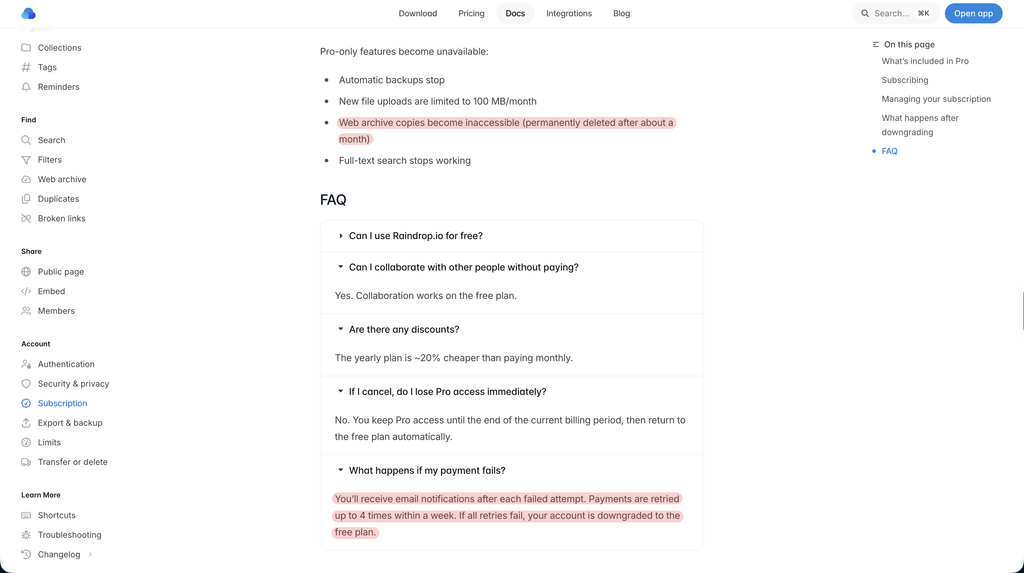
If you think paying for Pro settles the ownership question, you’ve got yourself a reality check right now. “I own the archive” and “I have access to the web archive as long as I keep paying” are two different things, and the latter is what most users don’t realize until it’s too late.
While Raindrop has a generous 30-day period to regain access by subscribing to a paid plan, it still raises the question of ownership. Do you actually own your library?
You’d think export means you have locally backed up everything, but that’s not the case with Raindrop.
You can’t export highlighted text with the respective colors; only the highlighted text & the URLs get exported. Uploaded files like images and PDFs don’t get backed up (even for paid users). So when you enable daily backup, you’re leaving uploaded files on the Raindrop servers.
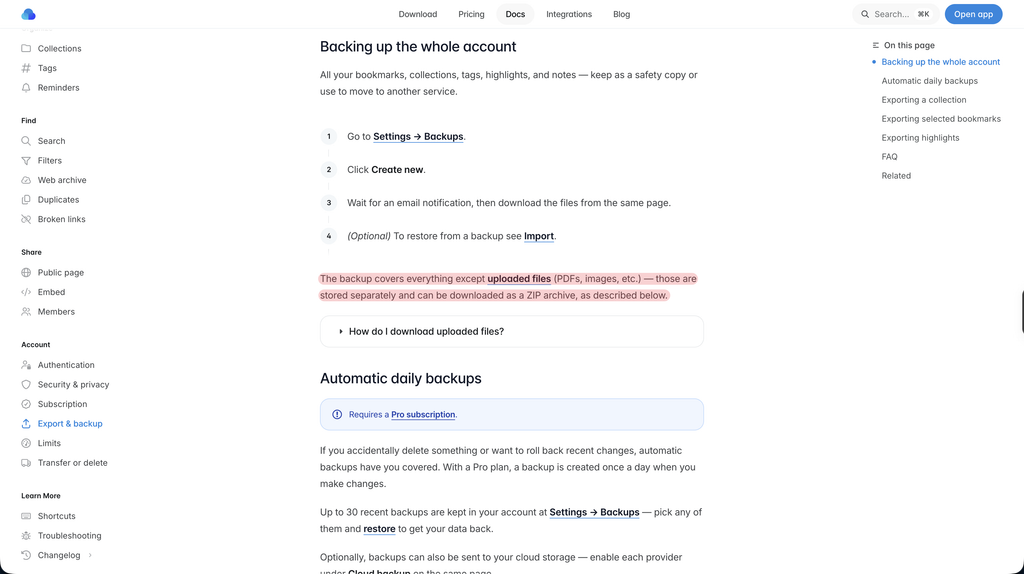
Sure, you can download it separately, but it’s not backed up even for paid users; that’s a fact you must be aware of.
Your Data Sits Unencrypted On Someone Else’s Server
Would you trade convenience for privacy? The convenience of full-text deep & semantic search, auto-tagging, and previews. Also, Stella AI, Raindrop’s native AI assistant, which runs natively on their servers, needs to read your documents to deliver answers and search results.
Raindrop is one of the most popular bookmark management tools out there, but very few are aware of this. Your entire library is stored unencrypted on Raindrop servers.
You might think a bookmarks manager doesn’t need privacy features like end-to-end encryption until your data is a part of a breach. This is not your fault; this category of tool might not have occurred to you as a privacy risk in the first place.
You’re not just saving links; you’re sharing documents and images that might be significant to you, that AI can access at all times. With highlight notes & tags, you also add context about those links, and that sits on Raindrop servers, unencrypted.
This is not just asking for personally identifiable information; it’s potentially risking your data and leaving it at the mercy of a breach.
One Person Is Building This, And You Don’t Know What’s Next
The problem isn’t a solo developer behind the scenes not knowing the future. Raindrop users have been complaining that the lack of transparency is a problem. Long-time users who have been invested in the tool for years, saving bookmarks and research, cannot bet on the continued involvement of the founder.
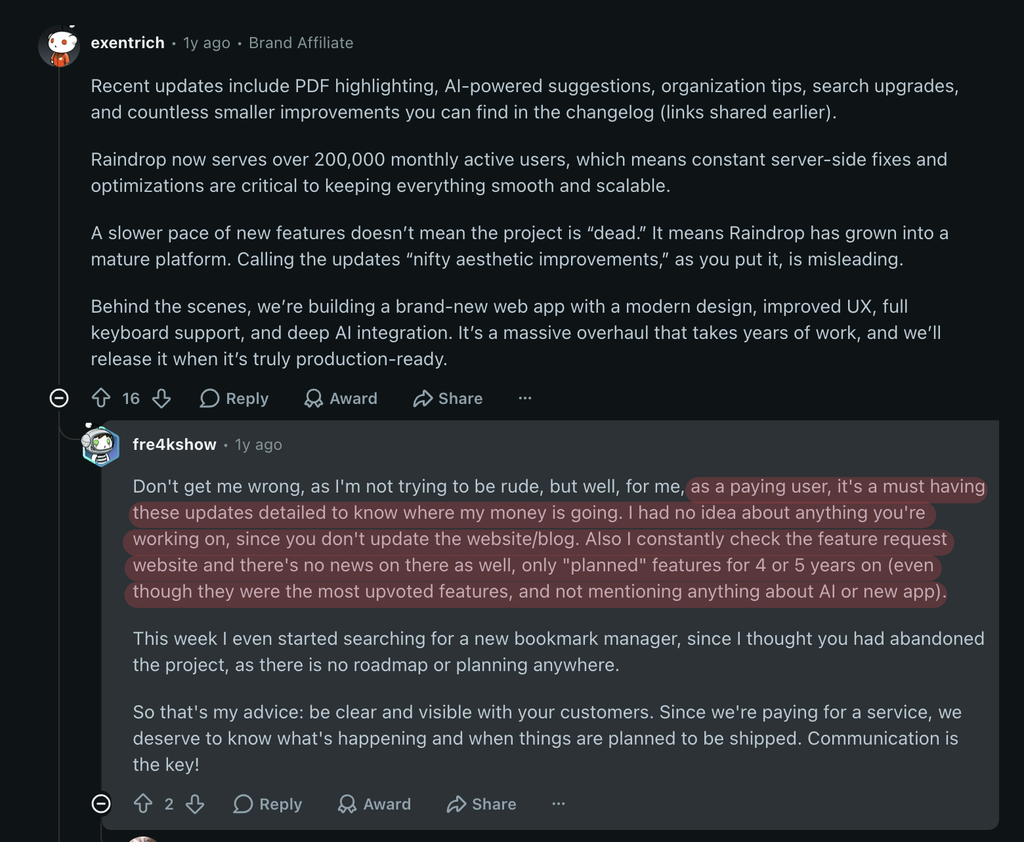
I must say, Raindrop users have genuinely appreciated the direct response they get from the founder on issues they’ve had while using the product, but the lack of a roadmap is something existing users are complaining about.
Despite the convenience of outstanding search, users have complained that the current situation of the product is full of glitches.
For example, users have been asking for a native note-taking feature for the past 6 years. The problem isn’t that the feature will ever be added to the product; the problem is that users don’t know the founder is even working on it.
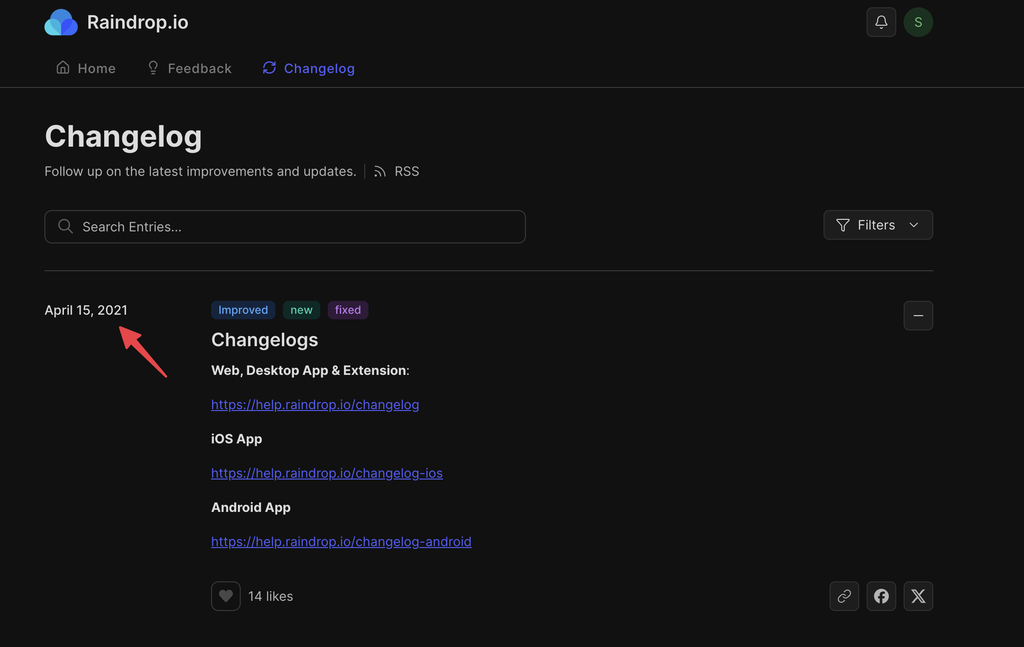
The silence is read as a risk when there’s no clear roadmap. The users who have been saving for years using the product don’t know if they should even continue saving or if the product is even on the verge of discontinuation. The changelog from Canny shows that the last update was in 2021.
Good Luck If Something Actually Goes Wrong
If you thought you wouldn’t be bothered about privacy issues, wait till you hear about support issues. There’s no denial that Raindrop is a solo-founder project, so the founder is the one doing everything, and trust me, I’m saying it from experience, it’s not easy.
It takes several sleepless nights to keep the product functioning for hundreds of thousands of users. However, for someone who has been trying to get in touch with support via email, the delay is just unacceptable. There are other instances where users are looking for alternatives, just because of a lack of support.
Despite being one of the best bookmark manager tools on the internet, losing customers just because of a lack of support is just… painful for users and the founder.
Some users get a fast, personal reply. Others wait days with nothing. With one person handling everything, both are always going to be true at the same time. When you have a feature request and it remains unanswered, it is fine, considering the founder is single-handedly managing everything.
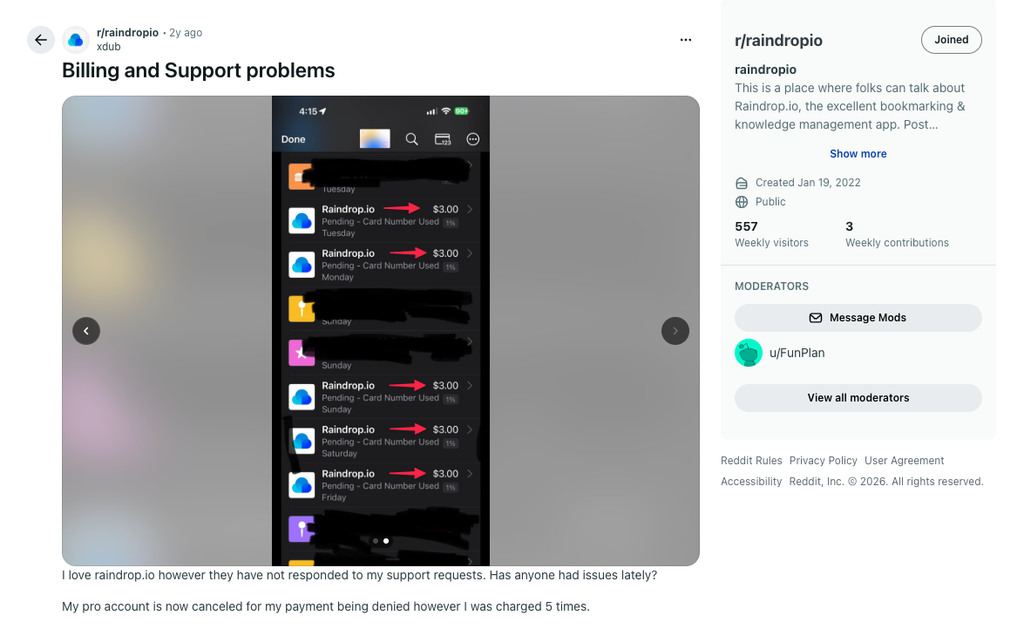
However, no response to billing issues where a user was charged 5 times without even activating paid features is a bigger issue hiding in plain sight.
At Some Point, You Start Looking For A Way Out
Nobody switches tools just because of one instance of a slow reply from support or a confusing search result until one of them costs them a lost page or an unresolved billing issue. Trusting a system comes at a cost, and users who have lost something while trusting the system have a tough time trusting it again.
Imagine looking for a page you’re sure you saved, but it’s not there anymore. To make it worse, you didn’t even know that you’d lose the saved page in the event of a downgrade. Would you continue using the service?
That’s exactly when you start looking for alternatives. Googling “Raindrop.io alternative” becomes a choice. This is the point where the failed patterns finally outweigh the inertia of just saying, complaining, and waiting for resolution.
Most Alternatives Are The Same Cage, Different Paint
Almost all digital asset management tools or bookmark managers aren’t self-hosted. That is, your data stays on someone else’s servers. This means remaining at the mercy of their will to continue the tool or not.
Two tools exist that let you self-host your bookmarks for free – Floccus & Brain tool. However, Floccus doesn’t support full-text semantic search. On the other hand, Braintool is limited to Chromium-based browsers only.
Let’s explore Raindrop alternatives and help you pick the best one for you.
Other Bookmark Apps Aren’t Actually Different
When you switch tools without understanding where your data will be stored, you will get the same problem in a different UI. For example, moving links from an unencrypted server to another changes your dashboard, but it still leaves your personal knowledge at risk, which you’re already running away from.
Leaving your data unencrypted on external servers means you still don’t own your own intellectual capital, still leaving you exposed to hidden paywalled features or technical hiccups that come with it, while leaving data at the mercy of the server owners.
Self-Hosting Solves Ownership, Costs You A Server
You already have a local folder containing files you reuse often and an army of browsers you use to bookmark webpages, which doesn’t even cost a server. But does that solve your problem? It doesn’t. That’s not what the browser and local folders are supposed to do.
There are open-source tools like Linkwarden, KaraKeep, and Faved that are self-hosted. These tools offer perfect privacy plus data control. While these tools don’t cost anything, setting up these tools requires servers and technical setups like Docker configurations, terminal setup scripts, reverse proxies, and personal server management.
That’s the actual cost of using these tools. With these tools, you’re your own IT support, and one monitored hard drive or a crashed one will wipe years of your unbacked highlights.
Going Local-First Means Giving Up Convenience
If you’re an “I’ll save data as plain files locally” person, then you have to deal with sync & search. Most file searches, be it Windows or macOS, are bad. Especially when you have to extract insights from the saved library without accessing them individually.
While treating your data as plain, interoperable files rather than locking it inside an app’s private database, you ensure your digital personal knowledge outlives any SaaS company. But are you sure that solves a power user’s problems?
There are Command Line Interface tools like Buku, Bkmr, and NB that give you 100% privacy, but they completely strip away visual card previews, cross-platform access, and, most importantly, backup.
If you use iCloud, Google Drive, OneDrive, or Dropbox, you can’t save highlights, notes, and tags for them. Even if you copy-paste text into the respective cloud notes, you can’t add notes, tags, and organize them for later.
You achieve 100% data ownership, but your personal knowledge becomes static, hard to sort, and ultimately transforms into another personal knowledge graveyard you were avoiding all this while.
What People Actually Want?
All these workarounds using self-hosted tools selling you privacy points to the same unmet need – owning data without becoming ‘sysadmin‘, only to spend more time maintaining the setup than actually doing what you created it for in the first place.
The self-hosting and command-line tools solve privacy and ownership needs but come with a baggage of technical effort. Most people try this route and don’t stick with it. Switching layouts doesn’t add any value if your data is either hosted on third-party servers or you have to spend more time taking care of the data than actually using it.
There has to be a tool that strikes a balance between self-hosting and freedom from technical know-how.
Why I Built SyncMyCopy To Sync With Your Own Google Drive
I created SyncMyCopy to solve my own problem. I’ve been copywriting & practicing SEO since 2011. I’ve seen the industry evolve, and one thing I didn’t like is scattered personal knowledge. As an SEO copywriter, I wander across the web gathering inputs for creating various marketing assets.
You can own your data and still have the convenience of having your data in your own account, and still search, sync, and organize your personal knowledge.
SyncMyCopy syncs your data to your own Google Drive, delivering ironclad data ownership without needing to self-host, manage Docker containers, or even touch a line of code. I don’t collect personally identifiable information because there’s no need to and no database to store it. It’s your account managing your data; SyncMyCopy simply facilitates this.
To search through your digital personal knowledge & research, there’s AI ready to be enabled in settings, but that’s not mandatory. The pro users can enable AI, but nothing breaks without it.
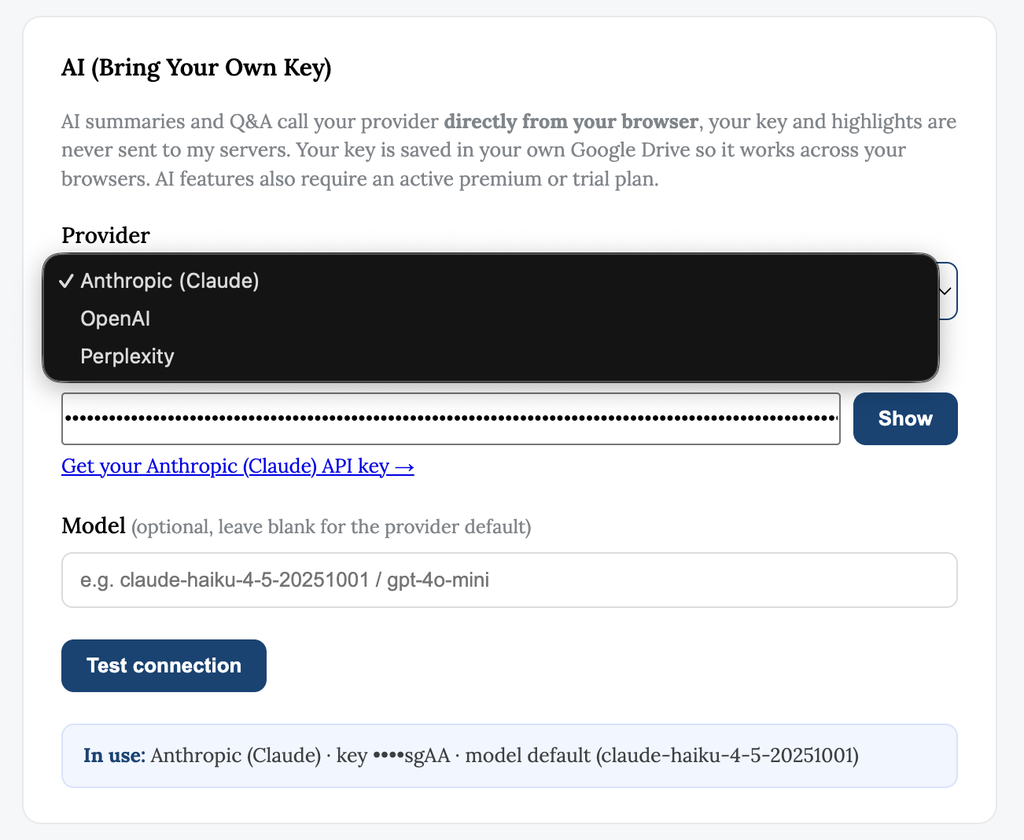
This also means that AI search only works if you bring your own API key, so nothing reaches LLMs without your own consent.
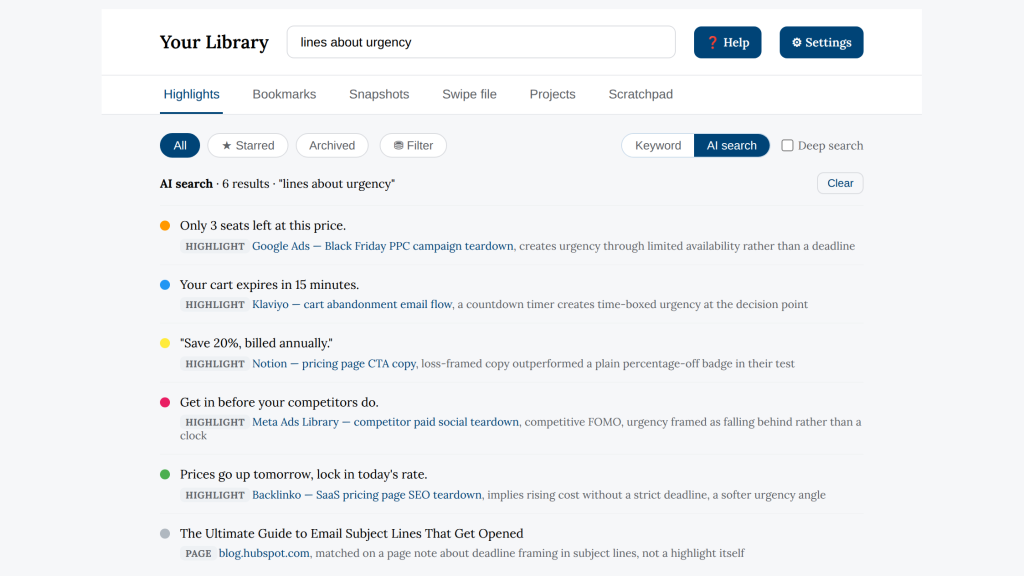
Furthermore, you can choose an AI provider you trust and bring your own key to use AI features. I don’t add any markup, no margin to steal from you. You can search by meaning when you feel you can’t recall much. AI search can help you find saved items just with the gist of what you remember.
All users can sync all their bookmarks across all browsers (Chromium-based for now; support for Safari & Firefox is coming soon). This is helpful for those who read and save a lot and use multiple browsers.
I faced a massive problem when I was saving personal knowledge as browser bookmarks. When I was working for a B2B SaaS client, I came across a very good article to pick insights from. Three days later, when I was actually working on the copy, I went looking for that article.
I forgot the title, but I could recall the content, though not exactly. I was left with no option but to manually open the folder I regularly save to. I also tried bookmarking a random page to see which folder was last used, but even that didn’t help.
With SyncMyCopy, I can save such an article in specific client folders. Everything related to that client is now available in one place. Be it bookmarks, highlights, snapshots (web archives), or clips.
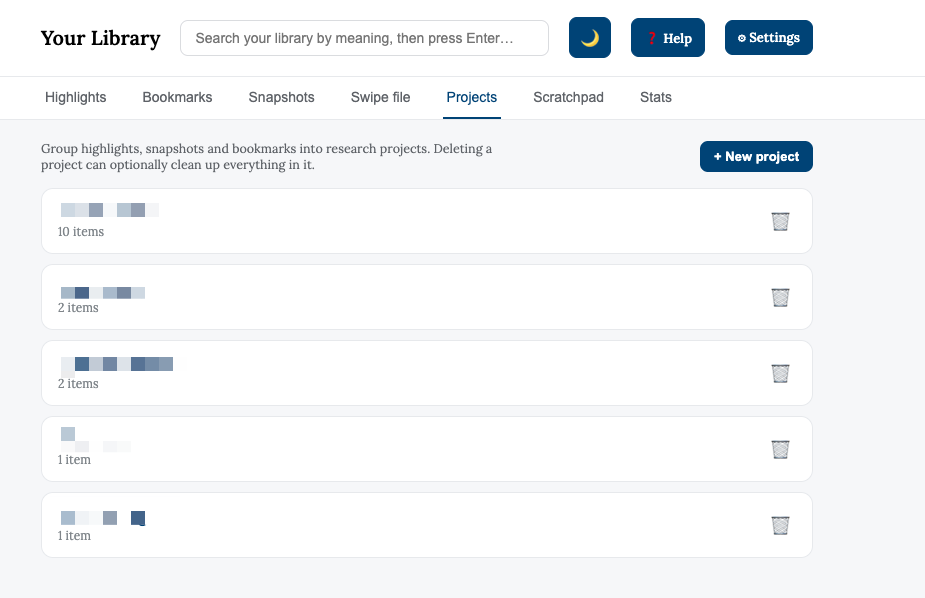
Lastly, your data lives in your own drive. This means you don’t have to depend on me for the future of the product. Even if I shut down the app, everything you have saved will remain yours forever, as long as you have the extension installed on your browser.
Neither can I see nor can I control your data; it’s yours for years to come.
Raindrop vs SyncMyCopy: What’s Actually Different
Raindrop vs SyncMyCopy
Same category of tool. Very different answer to “where does my data actually live?”
| Feature | SyncMyCopy $3.14 / month | Raindrop.io ~$3–3.54 / month* |
|---|---|---|
| Where your data lives | ✓Your own Google Drive | ✗Raindrop’s own servers |
| Permanent copies after canceling | ✓Stay in your Drive, unaffected | ✗Deleted ~30 days after downgrade |
| Export | ✓Already sitting in your Drive as real files | ~Links export easily; full snapshots, highlights, and files don’t fully carry over |
| Search (no setup) | ~Keyword matching & AI-powered deep search | ~Keyword search, with reported word-order inconsistencies |
| AI-powered semantic search | ✓Opt-in, your own API key, no markup | ~Built-in (Stella), runs on Raindrop’s servers |
| AI reads your saved content | ✓Only if you enable it, with your own key | ✗Stella accesses your library, even if you don’t use it often. |
| Cross-browser bookmark sync | ✓Free, native | ✓Included |
| Note-taking alongside saves | ✓Built in | ✗Not supported |
| Organization | ✓Projects by client or campaign | ✓Nested folders + tags |
| Encryption | ~Inherits Google Drive’s standard encryption; not end-to-end | ✗Stored unencrypted on Raindrop’s servers |
| Mobile app | ✗Planning | ✓iOS + Android |
| PDF highlighting | ✗Implementing | ✓Supported |
| RSS / newsletter ingestion | ✗Planning | ✓Supported |
| Free tier | ~Full sync features, no separate free plan | ✓Genuinely generous unlimited bookmarks and collections |
| Team behind it | Solo-builtSolo but active developer, plus your files live in your own Drive either way | Solo-builtWidely known, but unpredictable future |
*The features and pricing listed here are as of the writing. Raindrop’s exact current price and features might vary when you read in the future.
What You’ll Actually Pay
No tiers to compare, no feature-gating to decode.
- Sync to your own Google Drive
- Free cross-browser bookmark sync
- Offline page snapshots
- Projects for client/campaign organization
- Bring-your-own-key AI search. No markup
- Unlimited bookmarks and collections (free)
- Permanent copies (Pro, subscription-dependent)
- Full-text + Stella AI search (Pro)
- Mobile apps, PDF highlighting, RSS (Pro)
What SyncMyCopy Doesn’t Do Yet?
I want to keep transparency and privacy at the center of this project. I want to be clear about what SyncMyCopy doesn’t do yet to keep you informed of the timeline. SyncMyCopy isn’t a finished product; I have several useful features planned.
Being a copywriter myself, I can’t ship all features at once. I plan, validate, test, and then start working on development. This is time-consuming, but I want to keep you, the users, in the know. I’m working on a public dashboard to document my progress in the project so that you know what’s coming.
Here’s what’s coming next gradually:
- Public & engaging roadmap
- PDF highlighting
- Shareable tags, project folders
- OCR support
- Upload custom documents (PDFs, images, and more)
- Better UI
- Progressive web app (PWA)
- … and a lot of useful features for power users
Who This Is For (and Who It Isn’t)
I have created SyncMyCopy primarily for marketing professionals who rely on research to create marketing assets matching their KPIs.
I’ve not over-engineered deliberately, considering the fact that marketing professionals prefer minimalistic UI that just does the job. Being a copywriter myself, I understand how essential it is to organize projects client-wise and keep project folders isolated. Which is why I chose Google Drive as storage for SyncMyCopy. With mobile & desktop applications (& PWA), users will have access to their library on the go.
- If you only want to highlight on a web page and save it across note-taking apps, you can use Readwise.
- If you’re okay using a personal knowledge management tool that has unencrypted access to your data and an unclear future, you can use Raindrop.
- If you want to self-host your personal knowledge with a technical overhead, you can choose any open-source tools like LinkWarden or KaraKeep.
What Changes Once Your Bookmarks Live In Your Own Drive
The biggest change I’ve tried to implement with SyncMyCopy is making your Google Drive your personal server without any technical know-how. Since your files are on your own Google Drive, nothing disappears or gets deleted, even if you downgrade to a free plan.
Even if the product discontinues, your data remains yours, accessible as long as the extension remains installed in your browser. I can’t touch your data or delete any of your data.
Furthermore, instead of digging through the graveyard of personal knowledge of digital assets, with the combination of Keyword & AI-powered deep search, you can find what you’re looking for without having to re-Google. You can also organize your research in folders to find it without searching.
Stop Piling Bookmarks. Start Actually Using Them
I’ve used Notion, Microsoft’s OneNote, Google Keep, Apple Notes, Spreadsheets, Pockets, Evernote, and countless other note-taking apps. The problem wasn’t finding a better app to dump links; the problem was retrieval. I just couldn’t find what I needed when I needed it.
None of these apps came close to what marketing professionals need. Notion came close; it was the only digital asset management tool that I subscribed to for years, but lately, even that has become very slow. Search is painful, and it’s over-engineered. I was a Notion power user & loved it for years, but that changed when I started searching.
Finding is a need that wasn’t solved effectively; I aim to solve that with SyncMyCopy. How many apps enable semantic search with features focused on marketing professionals?
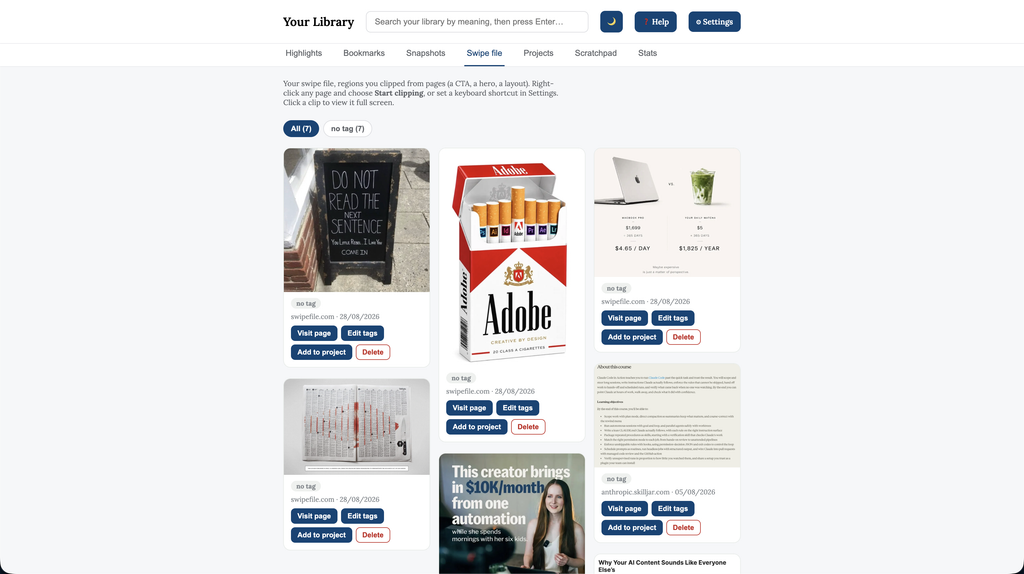
One example is the clips feature that SyncMyCopy offers (Raindrop or other alternatives don’t have this yet) where you can take freehand screenshots and save them in your library and organize them in project folders.
When you know where your data lives, without having to think about it, you can focus on what’s more important for a professional than being a sysadmin.
If you like a personal knowledge management tool that’s not over-engineered, self-hosted (without technical overhead) and 100% private, try SyncMyCopy today. Get started by importing your existing data.
Common Questions Before You Switch
#1 What happens to my saved pages if I cancel?
Nothing gets deleted; everything stays yours forever. Only you manage your data with 100% privacy.
#2 Is my data actually safe in Google Drive?
SyncMyCopy only accesses your email for verification; everything else remains in your own Google Drive.
#3 What if the developer stops maintaining this?
Since nothing is on third-party servers, even if the developer stops working on SyncMyCopy, the data continues to remain in your Google Drive. Nothing gets deleted; nothing goes anywhere.
#3 Will AI search read or store my content somewhere?
AI doesn’t store your content; it runs on top of your content only for the assets you choose. Semantic search uses AI to find what you’re looking for by meaning. You can also use AI to brainstorm inside folders to extract insights that aren’t available otherwise.
#4 Is this actually better than Raindrop, which has a good free tier?
Raindrop’s free tier is genuinely outstanding and generous. But the difference isn’t cost; it’s ownership and retrieval.